ScrewTurn

Active Trader Strategies API Community ChartStyles Community Commissions Community Components Community Indicators Knowledge Base Misc Optimizers PosSizers Providers Standard Indicators TASC Traders Tips TASCIndicators Tutorial Videos Visualizers
RSS

Navigation


Quick Search
»
Advanced Search »

PoweredBy
The Dotted ChartStyle developed by user dansmo represents each bar on a chart as a dot. Dots can be drawn based on either Open, High, Low or Close price, and their widths can be configured in a settings dialog.

The default value of the dot is 2 pixels. Right-click the chart and select "Chart Style Settings" - or simply hit Ctrl-Y on your keyboard - to invoke the dialog where you can configure the chart style.
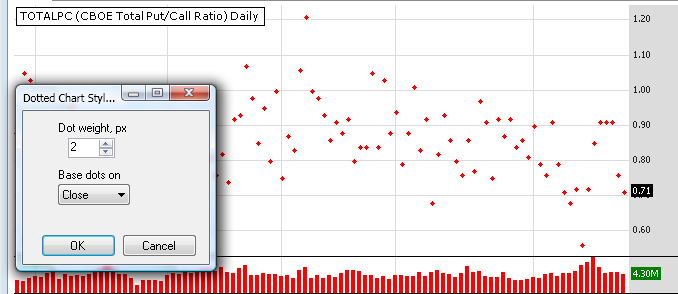
Dotted Chart Style in action (width = 2 pix)

Dotted Chart Style in action (width = 2 pix)

Important Disclaimer: The information provided by Wealth-Lab is strictly for informational purposes and is not to be construed as advice or solicitation to buy or sell any security.  The owner of Wealth-Lab.com assumes no liability resulting from the use of the material contained herein for investment purposes.

Used under license from FMR Corp. Copyright 2008 FMR Corp. All rights reserved.


ScrewTurn Wiki version 3.0.2.509. Some of the icons created by FamFamFam.